Performance is crucial for anyone with a website or an Api. Slow pages or endpoints can lead to the loss of users and revenue. Because who wants to use a slow service? I know that I don’t want to wait on my data.

The first step is to identify the right places to remedy. This is not straight forward. But the more data you have, the better. Some parts of a website are more important than others. I would put my focus on the most used sites and calls. I would also think about the lesser used sites and calls. Don’t people use them because they are slow? Or are they just not that important in daily use?
Get NordVPN - the best VPN service for a safer and faster internet experience. Get up to 77% off + 3 extra months with a 2-year plan! Take your online security to the next level

This is an affiliate link. I may earn a commission when you click on it and make a purchase at no extra cost to you.
There are several good tools for making these decisions:
- Google analytics
- Azure Application Insights
- RedGate tools (.net profiler, Monitor)
- JetBrains dotTrace
- Datadog
- And many more
Azure Application Insights is a low-cost tool if you are already on Azure. It has a lot of performance data you can dig into. For example: average duration and count. You can scope it down to a select period.

Get NordVPN - the best VPN service for a safer and faster internet experience. Get up to 77% off + 3 extra months with a 2-year plan! Take your online security to the next level

This is an affiliate link. I may earn a commission when you click on it and make a purchase at no extra cost to you.
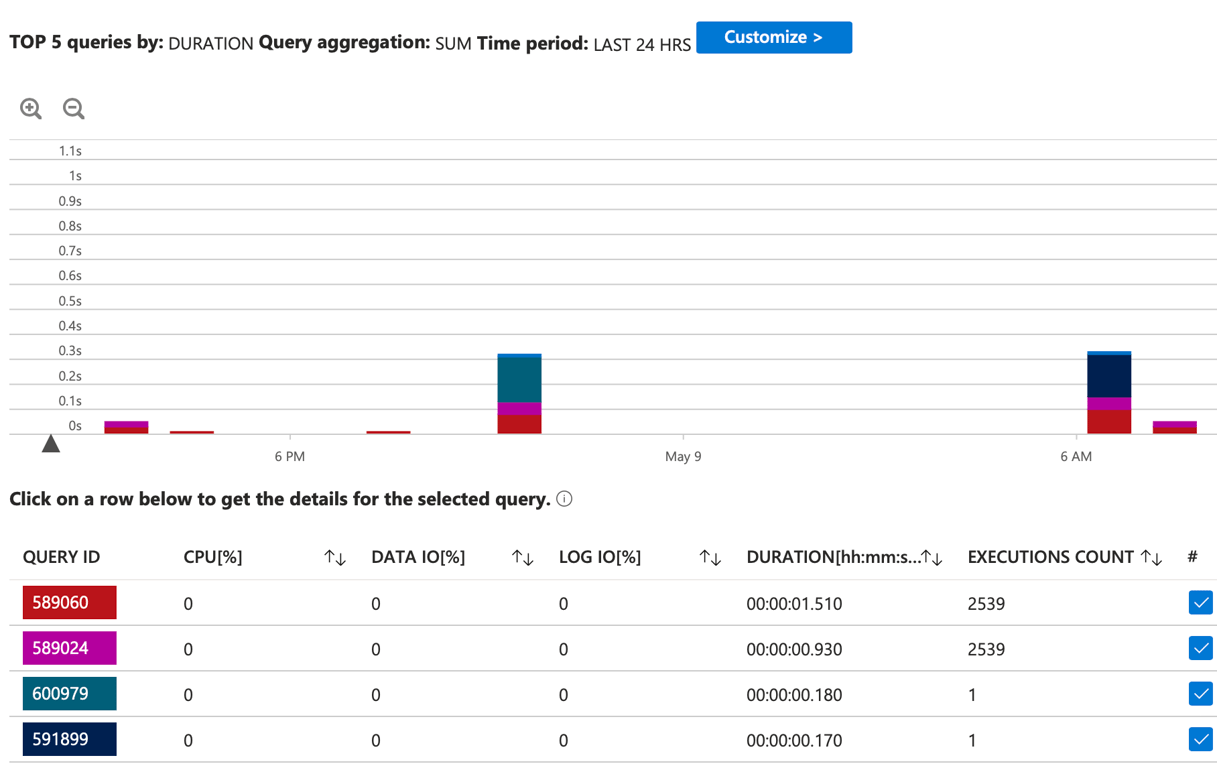
Azure Sql databases also have Query performance insights. You can see the most executed sql code, the longest running queries and I/O intensive queries and a custom view.
A Semaphore can be used to control access to a pool of resources. If you want to execute some function calls in parallel, you can use a Semaphore to control how many units of work (or threads) that can be executed at once. Doing work in parallel can be very useful if you are doing the same functions on different databases, and/or your work is mostly CPU intensive.
Keep in mind that you probably must do a lot of testing to find a good balance, because doing too much at the same time can cause your application to run out of resources. Or it can cause your SQL Server to be overloaded.
Get NordVPN - the best VPN service for a safer and faster internet experience. Get up to 77% off + 3 extra months with a 2-year plan! Take your online security to the next level
This is an affiliate link. I may earn a commission when you click on it and make a purchase at no extra cost to you.
Another important thought to keep in mind is that what works great in your development environment might not work as well in your production environment. I have done this mistake myself a couple of times. It turned out that when my code was running in production, with lots of use from customers, I overloaded the SQL Server and everything got slow. So testing is crucial.
using System;
using System.Collections.Generic;
using System.Linq;
using System.Threading;
using System.Threading.Tasks;

namespace SemaphoreSlimExample
{
    class Program
    {
        static async Task Main(string[] args)
        {
            // Sample work items (could be URLs, files, etc.)
            var items = Enumerable.Range(1, 20).Select(i => $"Item {i}");

            // Process up to 5 items in parallel
            await ProcessInParallelAsync(items, maxDegreeOfParallelism: 5);

            Console.WriteLine("All work completed.");
        }

        static async Task ProcessInParallelAsync(IEnumerable<string> items, int maxDegreeOfParallelism)
        {
            // SemaphoreSlim throttles the number of concurrent tasks
            using var semaphore = new SemaphoreSlim(initialCount: maxDegreeOfParallelism);

            // Create a task for each item
            var tasks = items.Select(async item =>
            {
                // Wait for an available “slot”
                await semaphore.WaitAsync();
                try
                {
                    // Your actual work goes here
                    await DoWorkAsync(item);
                }
                finally
                {
                    // Always release the slot, even on exceptions
                    semaphore.Release();
                }
            });

            // Wait for all tasks to complete
            await Task.WhenAll(tasks);
        }

        static async Task DoWorkAsync(string item)
        {
            // Simulate some asynchronous work
            Console.WriteLine($"Starting {item} on thread {Thread.CurrentThread.ManagedThreadId}");
            await Task.Delay(TimeSpan.FromSeconds(new Random().NextDouble() * 2));
            Console.WriteLine($"Finished {item}");
        }
    }
}
I am using the SemaphoreSlim, because it is a lightweight implementation and simple to use. If you need cross-process coordination or named semaphores— you can use Semaphore.
Why this pattern?
Throttling:
SemaphoreSlim(initialCount)controls how many tasks can enter the “critical section” simultaneously—in this case,maxDegreeOfParallelism.Asynchronous waiting:
await semaphore.WaitAsync()doesn’t block a thread; it lets the runtime schedule other work.Safety: Using
try…finallyensures that even ifDoWorkAsyncthrows,semaphore.Release()is always called, preventing deadlocks.Disposal: Wrapping
SemaphoreSlimin ausingensures its internal wait handles are cleaned up when you’re done.
You can tweak:
maxDegreeOfParallelismto match CPU cores or external resource limits.The work delegate to do HTTP calls, database operations, file I/O, etc.
Add cancellation by passing a
CancellationTokento bothWaitAsyncand your work.
In short, keeping your site or API responsive means first pinpointing the heaviest hitters with profiling tools like Azure Application Insights or dotTrace, then carefully introducing parallelism—SemaphoreSlim is ideal for throttling simultaneous work—to speed up CPU‐bound or I/O‐bound operations. Always validate your settings under realistic load (not just in development) to avoid overloading your database or servers. With measured tuning and thorough testing, you’ll ensure a fast, reliable experience for every user.
Get NordVPN - the best VPN service for a safer and faster internet experience. Get up to 77% off + 3 extra months with a 2-year plan! Take your online security to the next level
This is an affiliate link. I may earn a commission when you click on it and make a purchase at no extra cost to you.